Tutorial • Data Viz
Birth City to Ballpark: Mapping How Far Every MLB Player Traveled to Get to Work
September 2026
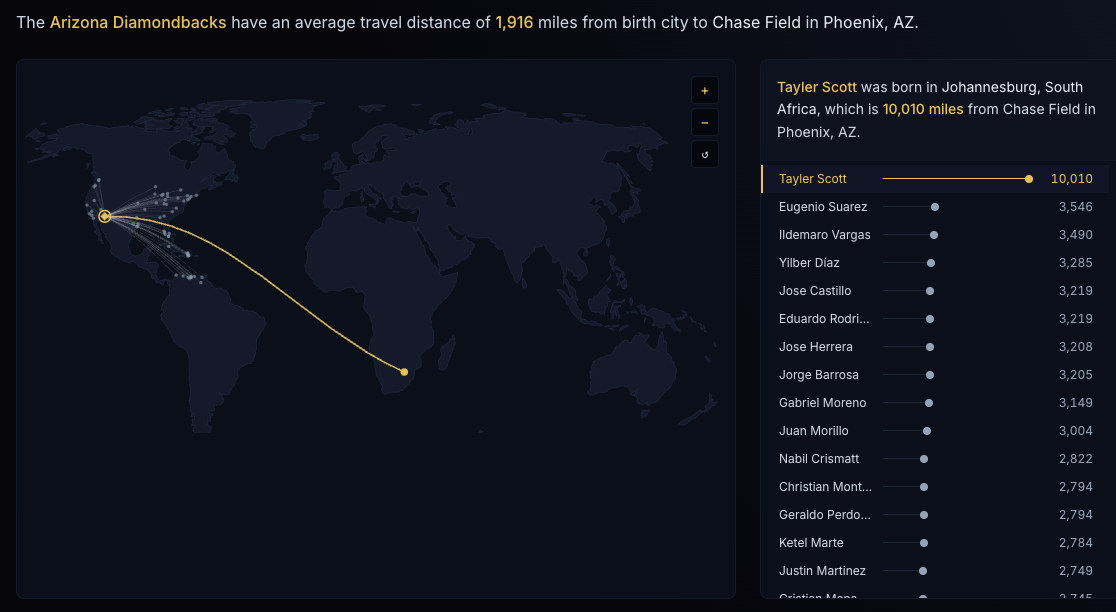
Every baseball player has a starting point. For Corbin Carroll it’s Seattle. For Ketel Marte it’s Nizao, Dominican Republic. For Tayler Scott, it’s Johannesburg, South Africa, which is 10,010 miles from Chase Field in Phoenix.
I wanted to see all of those journeys at once, so I built Birth City to Ballpark. Pick any MLB team, and the map draws an arc from every player’s birthplace to the team’s home stadium. This post covers how it works, including the parts that turned out harder than expected, and how Claude Code fit into building it.
The question
How far did each roster travel to get here?
Baseball is unusually global, but a box score doesn’t show it. A roster is a list of names. A map shows you the Venezuelan pipeline, the Dominican Republic cluster, and the lone arc from southern Africa.
The 2025 Arizona Diamondbacks average 1,916 miles from birth city to Chase Field. That number hides a lot, and a single average can’t show the spread, so I made the map.
The stack
- Next.js 16 (App Router) with React 19, TypeScript, and Tailwind v4
- d3-geo for the map projection (Natural Earth) and great-circle path generation
- topojson-client and world-atlas for the world landmass geometry, bundled as an npm package so there’s no runtime fetch
- d3-zoom, d3-selection, and d3-transition for pan and zoom on the SVG map
- The Lahman Baseball Database (Teams, Parks, People, and Appearances CSVs) as the data source
- The cities.json npm package, a GeoNames-derived world city gazetteer, for offline geocoding
- Claude Code as my pair programmer for most of the build
Data first, at build time
The most important decision was that nothing about the data happens at runtime. A Node script, scripts/build-travel-data.js, does all the work when the content updates, and writes a single static JSON file that the React component imports directly. Claude Code and I wrote and refined this script together.
There were two reasons for that. The deploy environment couldn’t reach most external network services, so live geocoding APIs weren’t an option. And it turned out to be the better architecture anyway: the page loads fast, there are no API costs or rate limits, and it has no network dependency beyond serving static data.
The raw Lahman CSVs (about 11 MB) and the build script are both committed to the repo, so anyone can regenerate the dataset from scratch.
The script runs in six steps:
- Build the rosters. Filter Appearances.csv to the target season. “Every player who appeared” means exactly that, so the September call-up who threw two innings is included.
- Join birthplaces. Pull each player’s birth city, state, and country from People.csv.
- Find the home park. Resolve each team’s park city via Teams.csv and then Parks.csv, with a manual alias table for park names that don’t match or have been renamed.
- Geocode every unique birth city and park (more on this below).
- Compute distances. Calculate the haversine distance in miles from birth city to stadium.
- Write the JSON. About 1,685 players end up geocoded, roughly 97% of them to an exact city.
The hard part: geocoding
Turning “Bolivar, Venezuela” into a latitude and longitude sounds like a solved problem. It isn’t, once you start with messy real-world place names. Lahman’s names are informal, while gazetteers use formal ones. “New York” needs to become “New York City.” “Santiago” in the Dominican Republic needs to become “Santiago de los Caballeros.” Accents don’t line up either: “Mayagüez” versus “Mayaguez.”
This is where working with Claude Code paid off most. Rather than hunting for one clever algorithm, we iterated: run the script, look at which players failed to match, fix the cause, and run it again. That loop is fast when you have an assistant that can read the output and edit the script in the same session. It produced a layered fallback chain, where each layer catches what the previous one missed:
- Exact match against the cities.json gazetteer.
- Alias table for colloquial names (“New York” → “New York City”).
- Accent-folding, so punctuation and diacritics don’t cause misses.
- Hand-verified coordinate overrides for the few hometowns, mostly small Dominican and Venezuelan towns, that are missing from the gazetteer entirely.
- State or country centroid for the small remainder.
That last layer matters for honesty. Any player who falls back to a centroid is flagged approx: true, and the UI shows a ~ in front of their distance (Connor Kaiser’s ~839 miles, for example). I would rather show a fuzzy point that’s labeled as fuzzy than quietly drop a player or pretend precision I don’t have.
Measuring distance
Distances are great-circle miles, the shortest path over the Earth’s surface, calculated with the haversine formula. Given a birth city at latitude φ₁ and longitude λ₁, and a stadium at φ₂ and λ₂ (all in radians):
where:
- Δφ = φ₂ − φ₁ (difference in latitude)
- Δλ = λ₂ − λ₁ (difference in longitude)
- R = Earth’s radius, about 3,959 miles
In JavaScript, the whole thing is only a few lines:
function haversineMiles(lat1, lon1, lat2, lon2) {
  const R = 3959; // Earth's radius in miles
  const toRad = (deg) => (deg * Math.PI) / 180;

  const dLat = toRad(lat2 - lat1);
  const dLon = toRad(lon2 - lon1);

  const a =
    Math.sin(dLat / 2) ** 2 +
    Math.cos(toRad(lat1)) * Math.cos(toRad(lat2)) * Math.sin(dLon / 2) ** 2;

  return 2 * R * Math.asin(Math.sqrt(a));
}
Run it on Johannesburg and Phoenix and you get Tayler Scott’s 10,010 miles. A team’s average is just the mean of these distances across its roster.
A plain straight-line formula would be wrong here, because the Earth is a sphere and lines of longitude converge toward the poles. Haversine accounts for that curvature, and it’s also the same idea behind the arcs on the map: d3-geo draws the path along the sphere first and projects it second.
These aren’t travel distances, since nobody flew Johannesburg to Phoenix through the planet in a straight line. The number measures how far apart two places are, which makes players comparable.
Drawing the map
The world landmass topology is converted to GeoJSON once at module load, not on every render, and projected with geoNaturalEarth1().
The arcs were the most satisfying part. I feed each birth-city-to-stadium pair through d3-geo’s geoPath() as a LineString. d3 adaptively resamples the line along the sphere before projecting it, which gives arcs their curved, flight-path look. If you drew a straight line between two already-projected points, you’d get something flat and wrong. The curve comes from doing the math on the globe first and the projection second.
For pan and zoom, d3-zoom drives a transform on an SVG <g> that wraps the map. Stroked elements use vector-effect="non-scaling-stroke", so borders and arcs stay crisp at any zoom level instead of getting chunky when you zoom in on the Caribbean. The +/− and reset (↻) buttons call the zoom behavior programmatically, while wheel-zoom and drag-to-pan work natively through d3-zoom’s pointer handling.
Claude Code was also a big help here. Wiring d3’s imperative zoom behavior into a React component is fiddly, and having it draft that integration and then tune it against the running page saved a lot of trial and error.
The interface
- A team selector with all 30 clubs, color-coded in real team colors. Click one and the roster swaps.
- The map, with one arc per player.
- A headline sentence stating the team’s average travel distance in plain English.
- A lollipop chart below the map. Instead of a plain ranked list, each player gets a stem and a dot, scaled to that team’s longest trip. Click a player and their arc highlights on the map, with a detail callout: “Tayler Scott was born in Johannesburg, South Africa, which is 10,010 miles from Chase Field in Phoenix, AZ.”
The map and the chart do different jobs. The map shows patterns, and the chart puts a name and an exact number on each arc. The page is fully responsive, and tap-to-select works the same as click on mobile.
Building it with Claude Code
Since this site is about how I make things, here’s what working with Claude Code was actually like on this project.
- It handled the tedious parts. Parsing four large CSVs, joining them, and writing the alias and override tables are exactly the kind of work I’d rather not hand-write.
- It shortened the debug loop. When the geocoder missed a player, we could look at the failures, decide on a fix, and re-run in minutes.
- I stayed in charge of the decisions. Choosing static precomputed data over live APIs, flagging approximations with a ~ instead of hiding them, and deciding what the visual should say were mine. Claude Code made those choices cheap to implement and easy to change my mind about.
If you’re building a data visual like this, I’d recommend the approach. Write down what you want the reader to see, then use the tool to get there faster.
Caveats
- Birthplace isn’t where a player grew up, trained, or signed.
- About 3% of players are approximated to a state or country centroid (marked ~).
- Distances are straight-line, not travel routes.
- It only covers the 2025 season.
Try it
Pick your team and see where everyone came from: Birth City to Ballpark →
Roster, birthplace, and park data from the Lahman Baseball Database (Chadwick Bureau / seanlahman.com).